I Asked ChatGPT to Run My Critical Path. It Invented One.
Every planner has tried it by now. You open ChatGPT or Claude, paste in your schedule — or upload the file — and ask the obvious question: what's on the critical path, and when do we finish?
You get a beautiful answer. Formatted, confident, specific. Dates, floats, a neat list of driving tasks.
Almost none of it is computed. Here is what actually happens, and how to prove it on your own file in five minutes.
The model never saw your whole schedule
A mid-size programme is 3,000–5,000 activities with 5,000+ logic links. A large one is ten times that. A chat model reads a limited amount of text at a time, so what it "knows" about your schedule is a sample — the first chunk of your export, maybe the summary rows, whatever fit.
Then it answers questions about the whole network as if it had run the calculation. It hasn't. There is no forward pass, no backward pass, no float arithmetic. There is a very fluent prediction of what a critical-path answer sounds like.
That's why the numbers feel right. They were generated to feel right.
Four failure modes you can reproduce today
1. The count changes between asks. Ask "how many critical tasks are there?" twice, an hour apart, in slightly different words. Planners who test this get different numbers — because each answer is a fresh prediction, not a lookup. A real engine returns the same count every time, because it counts the same set.
2. It agrees with your pushback. Tell it "that can't be right, Pump 0080 should be driving." Watch it apologise and produce a new answer centred on Pump 0080 — whether or not Pump 0080 drives anything. It is optimised to continue the conversation agreeably, not to defend a calculation. In a progress meeting, that's the most dangerous behaviour of all: it will confirm whatever the loudest person in the room believes.
3. It claims actions it never took. Ask it to change a view, hide links, apply a filter. It will say "Done" — cheerfully, specifically — having done nothing at all, because in a plain chat there is nothing for it to act on. If it claims success that easily about a button, imagine how it treats a float value.
4. The list doesn't add up. Ask for the critical tasks, then ask it to list them. The list and the count routinely disagree, tasks appear that were never in your file, and genuinely critical work — often the unglamorous documentation and procurement packages at the front of the job — is missing entirely, because the model never saw those rows.
Why this matters more than a wrong date
A wrong finish date gets caught. What doesn't get caught is the shape of the answer: a plausible critical path, confidently narrated, that sends the team to expedite the wrong package for a month. The cost of AI scheduling errors isn't embarrassment. It's a recovery plan built on a fiction.
The three-question test
Run this on your own current schedule, in any AI chat:
- "How many activities have zero total float?" — ask it again tomorrow.
- "List them." — count the list yourself.
- Pick one task you know is not critical and ask, "Why is [task] on the critical path?" — see if it defends the truth or invents a reason.
If the tool can't pass those three, it isn't analysing your schedule. It's writing about it.
What "AI for scheduling" should mean
The language model is genuinely good at one thing: understanding your question. The arithmetic has to come from somewhere else — a CPM engine that reads your actual activities and logic, runs the passes, and hands the model verified numbers to phrase. Same question, same answer, every time, with the working available when the client asks "says who?"
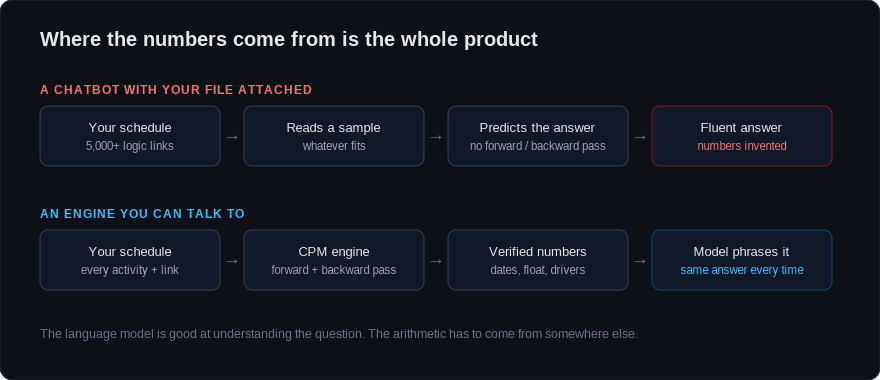
That's the difference between a chatbot with your file attached and a scheduling tool you can talk to.
ScheduleChat is opening to planners in small batches. It pairs a real CPM engine with the chat — every date and float computed from your file, nothing invented. Join the waitlist and we'll email you when your spot is ready.
Related: the MS Project setting that's been lying to you about your critical path