Total Float vs Free Float: The Difference That Causes the Arguments
"It has five days of float" is one of the most misleading sentences in project controls — not because it's wrong, but because there are two different numbers called float, and they answer two different questions.
The two definitions
Total float is how much an activity can slip before it delays the project finish. It's the difference between its late and early dates: LS − ES (equivalently LF − EF).
Free float is how much an activity can slip before it delays the start of any successor. It's the gap between the activity's early finish and the earliest early start among its successors.
Total float asks: does the project care? Free float asks: does the next activity care? The answers are often different — and the difference is where the trouble hides.
One small network where they part ways
Five activities, one calendar, finish at day 15:
- A (5d) → B (5d) → C (5d): the driving chain, 15 days.
- D (4d) runs after A, finishing day 9.
- E (3d) needs both D and B, so it starts day 10 (when B lands) and finishes day 13.
Now look at D. E can't start before day 10 anyway, so D could finish a day late and E would never notice: D's free float is 1 day. But E itself finishes at day 13 against a day-15 finish — E holds 2 days of total float, and D can borrow it: D can slip 3 days before the project finish moves. D's total float is 3 days.
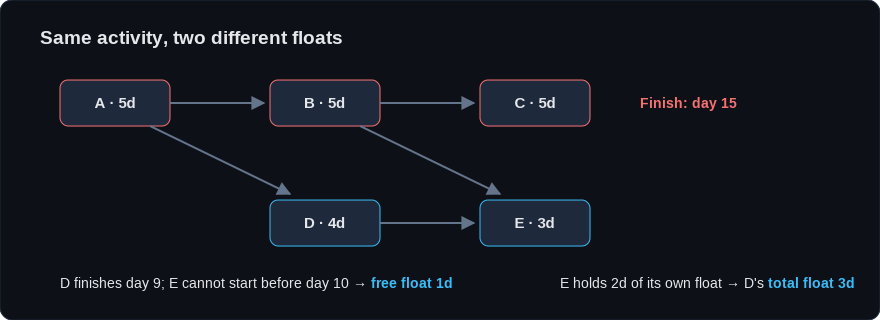
Both numbers are correct. Quote the wrong one in a meeting and you've either promised slack you don't have ("D can slip three days" — yes, and it pushes E the moment it slips two) or started an argument you didn't need.
Three things planners get wrong with float
1. Treating total float as owned by the activity. Total float is shared along a path. If D uses its 3 days, E's cushion is gone — the float belonged to the chain, not to D. This is why "everyone had float" and the project still finished late.
2. Reporting float without its basis. Float is computed against a calendar and, in files with multiple critical paths, against a basis. The same activity can honestly show different float in MS Project and P6 if the settings differ. (We wrote about the MS Project setting that changes it here.)
3. Watching total float and ignoring free float. A programme can look comfortable on total float while free float is zero everywhere that matters — every slip immediately disturbing a successor, every week a negotiation. Free float is the early-warning number; total float is the obituary number.
Which one should you ask for?
For your own work this week: free float. It tells you whether your slip becomes someone else's problem today.
For the project's finish date: total float — sorted ascending, it's the near-critical list, the work that deserves the management attention.
A scheduling tool should tell you which one it's quoting, every time. When we built ScheduleChat's criticality answers, that's the rule we held it to: float stated with its basis, grouped from the lowest total float up, in working days on the project's own calendar. Ask your current tool the same question twice — "how much float does D have?" — and see whether it answers the question you meant to ask.
ScheduleChat is opening to planners in small batches. Join the waitlist and we'll email you when your spot is ready.
Related: your schedule has 299 broken links