The MS Project Setting That's Been Lying to You About Your Critical Path
Buried in MS Project's options — File → Options → Advanced — is a checkbox most planners have never touched: "Calculate multiple critical paths."
It decides what your float means. And depending on how your programme is built, the wrong setting doesn't just shade the truth. It can show you a year of float on work that is, in reality, critical from the first week of the job.
What the checkbox actually does
With the box off (the default), MS Project computes one critical path: the chain driving the single project finish date. Every other task's total float is measured against that one finish.
That works for one integrated network. It breaks quietly on a programme made of parallel, semi-independent lines — nine pumps, six buildings, four phases — each with its own finish, loosely tied or not tied at all to the others.
On a file like that, a whole line can finish in March while the project finishes in June. With one-path calculation, that line's tasks carry months of float — measured against June. They look safe. But the line has its own contractual finish in March, and inside the line, one chain of work has no float at all. The standard view hides it completely.
With the box on, MS Project computes a critical path per independent network: late dates are set from each branch's own finish, so each line shows its own zero-float chain. Same file, same dates — a completely different picture of what matters.
A real file, two different truths
On a recent nine-line pump programme — about 4,700 activities — the difference looked like this:
- With single-path float, the document packages on each line (vendor drawings, submissions, approvals — the work that gates procurement) showed 124 to 376 days of float. Comfortable. No rush.
- On the file's own multiple-paths basis, those same packages were critical at zero float, starting in the first week of the programme — because in each line, they sit on the chain that drives that line's finish.
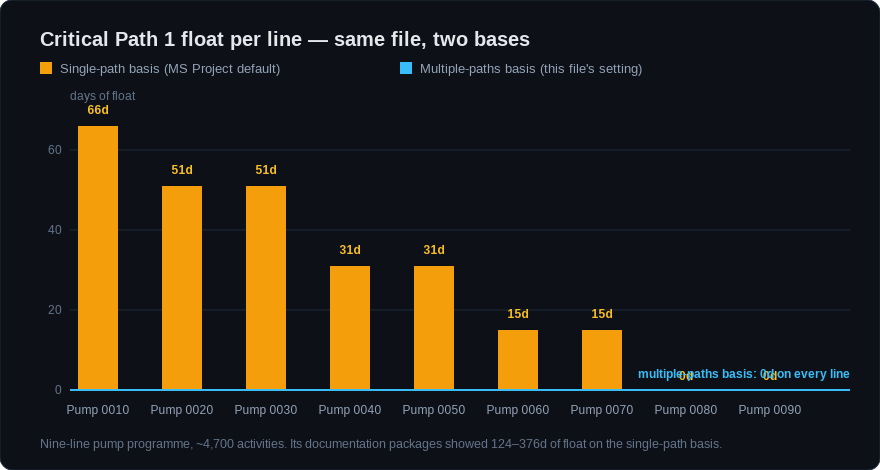
Both numbers came out of the same file. One of them would have told the team to relax about the very work that was already on the critical path of every single line.
How to check your own programme
- Know your shape. If your file is one integrated network, single-path is correct and the checkbox changes little. If it's parallel lines with separate finishes, the setting is decisive.
- Find the setting. File → Options → Advanced → "Calculate multiple critical paths." Note what your file is set to before you quote a float value to anyone.
- Run the tell-tale test. Pick a branch that finishes well before the project. If its latest-driving tasks still show large float, you're looking at single-path float — and that branch's real critical chain is invisible.
- Say the basis out loud. "Zero float" is meaningless until you add "on the multiple-paths basis" or "against the project finish." Half the arguments in progress meetings are two people quoting different bases at each other.
The deeper problem
Neither setting is "wrong." What's wrong is that the tool never tells you which basis a number came from — and neither does a chatbot, which will quote you a float with total confidence and no idea a basis exists.
A scheduling tool should state its basis the way a survey states its datum: automatically, every time, before the number. Because the number is the basis. Quote one without the other and you're not reporting float — you're starting an argument.
ScheduleChat is opening to planners in small batches. It reads the basis from your file, checks whether it fits your network, and states it on every criticality answer — per line, not just per project. Join the waitlist and we'll email you when your spot is ready.
Related: I asked ChatGPT to run my critical path. It invented one.